The recorder is the part of ShowShot you touch most, so it gets the most attention. This is a tour of the current extension: what it captures, what it keeps separate, and why the floating control bar sits where it sits.
Tab, window or screen
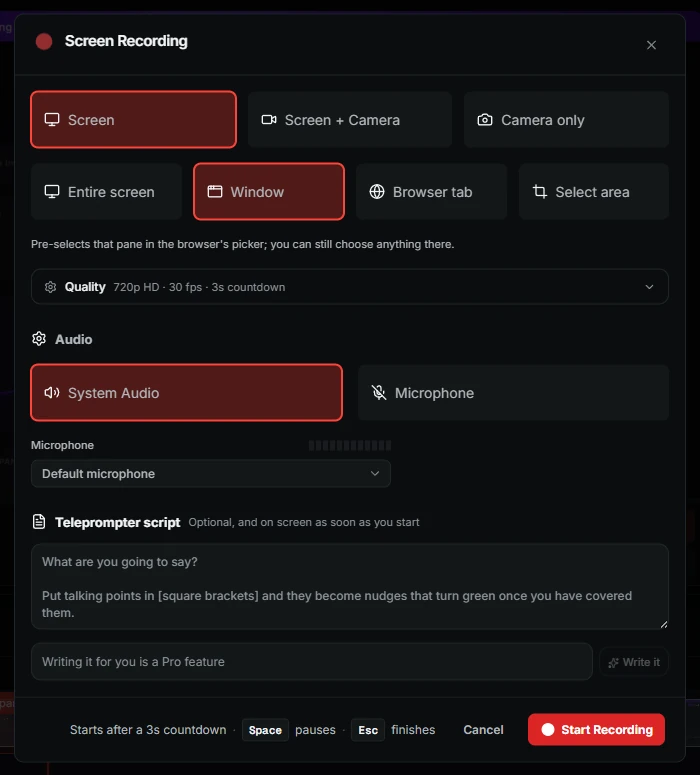
Pick the surface when you start. A tab take records the page you are on and nothing else, which is the one to use for a product walkthrough: no notifications, no other windows, and the camera can float over the page while you talk. A window take captures one app. A screen take captures everything, for the times you need to move between tools.
Screen, camera or both. The layout chosen here can be changed later.
Two tracks, not one
Your camera is recorded as its own file, next to the screen. That sounds like a detail and it changes everything after the take. Because the two tracks are separate, the layout is a decision you can revisit: a bubble in the corner, a side-by-side, a presenter cut-out over the page, or camera only for the intro. The watch page renders whichever layout you pick, and the recording never has to be redone.
The cut-out
The cut-out layout removes your background live, so you appear over the page with nothing behind you. It runs on the same matting engine the editor uses, and it is re-cut when you change layouts, so the edges stay clean.
The floating bar
While you record, a small window floats over the surface you are capturing with the timer, pause, restart and stop. It is placed at the bottom right of the recorded area, out of the way of the thing you are showing. Browser rules mean that window keeps a thin title strip, which is why it looks the way it does. The bar itself is never in your recording.
Stop opens the watch page. The link is in your clipboard before the page has finished loading.
After Stop
- The take is already uploaded. It streamed while you were recording.
- The watch page opens with a draft transcript, and the accurate one arrives a moment later.
- A title and chapters are written from what you said. You can keep them or type your own.
- The five-second preview is cut for the link.
Tip. If you record the same walkthrough often, set a default layout in your workspace. Every new take starts with it.